FEATURED STORY OF THE WEEK
H200 Drivers: The Backbone of NVIDIA’s Next-Gen GPU Performance

Enterprises today are rapidly deploying NVIDIA H200 GPUs to handle increasingly complex AI workloads. These GPUs deliver immense raw power, but that power does not translate into real performance unless the correct drivers are in place. The driver is the crucial link that allows the operating system, CUDA libraries, and applications to fully communicate with the hardware. Without it, the H200’s advanced capabilities remain inaccessible.
Consider the scale of the hardware involved: the H200 features 141 GB of HBM3e memory and a memory bandwidth of 4.8 terabytes per second, making it one of the fastest AI accelerators available today. These specifications promise outstanding throughput for training and inference, but the hardware cannot achieve its full potential unless paired with a driver designed to unlock every feature.
This is why H200 drivers are more than a technical detail; they are the foundation of performance, stability, and reliability. For IT leaders and infrastructure architects, understanding how drivers work and how they should be deployed is essential for building systems that are both efficient and dependable.
This blog serves as a practical guide, explaining what H200 drivers are, how they enable advanced GPU features, and what enterprises should consider when deploying them in on-premises, hybrid, or cloud environments.
1. What Are H200 Drivers and Why Do They Matter?
Every GPU requires a driver to function properly. A driver is software that enables the operating system and applications to send instructions that the hardware can understand. In the case of NVIDIA GPUs, this means allowing APIs such as CUDA to offload workloads from the CPU to the GPU, where parallel computation can be performed much faster. Without drivers, the GPU would be little more than idle hardware.
For the NVIDIA H200, drivers carry even greater importance because they manage advanced hardware features that define the GPU’s capabilities. The H200 introduces 141 GB of HBM3e memory and 4.8 TB/s bandwidth. These performance characteristics require specific driver-level controls to handle large datasets and maintain throughput during AI and high-performance computing tasks.
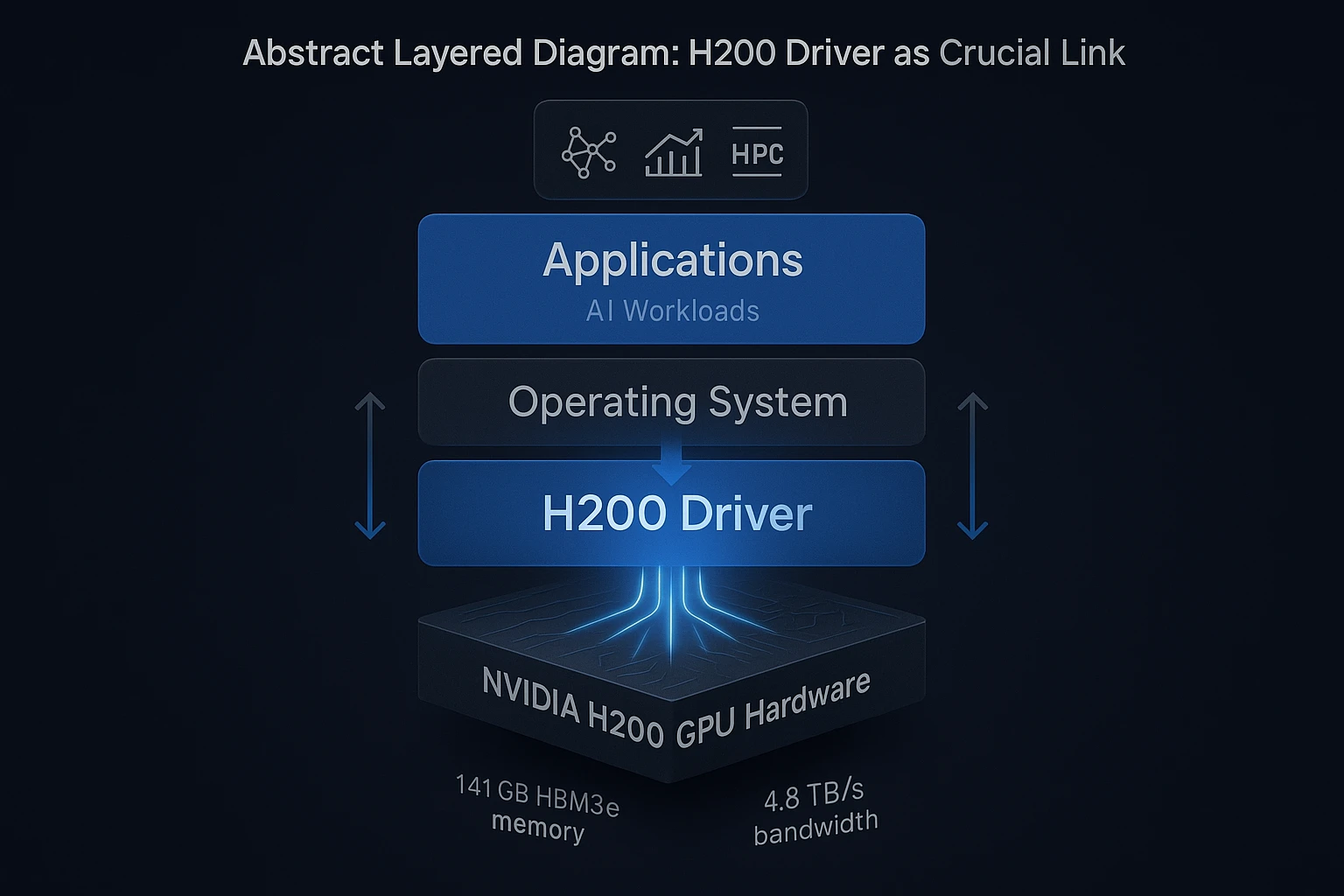
H200 drivers also enable NVLink, NVIDIA’s high-speed GPU interconnect. NVLink allows multiple GPUs to exchange data directly, bypassing the CPU bottleneck, and ensures that clusters of GPUs behave like a unified resource. In addition, drivers manage Multi-Instance GPU (MIG), a feature that allows the H200 to be partitioned into smaller, isolated GPU instances. Each instance can be allocated to a separate workload, enabling fine-grained resource sharing across users or applications.
The role of drivers goes beyond unlocking features. They ensure stability by providing tested compatibility with specific operating systems and kernels. They sustain performance by delivering updates tuned for CUDA versions and frameworks like TensorFlow and PyTorch. They also safeguard feature enablement, meaning that enterprises can reliably access hardware functions without compatibility issues. CUDA itself depends on compatible drivers to execute workloads properly.
In short, H200 drivers are the critical link that ensures organizations can fully deploy the GPU’s memory, interconnect, and partitioning features in production environments. Without them, the promised capabilities of the H200 would remain inaccessible.
2. How Do H200 Drivers Manage Advanced Features Like MIG?
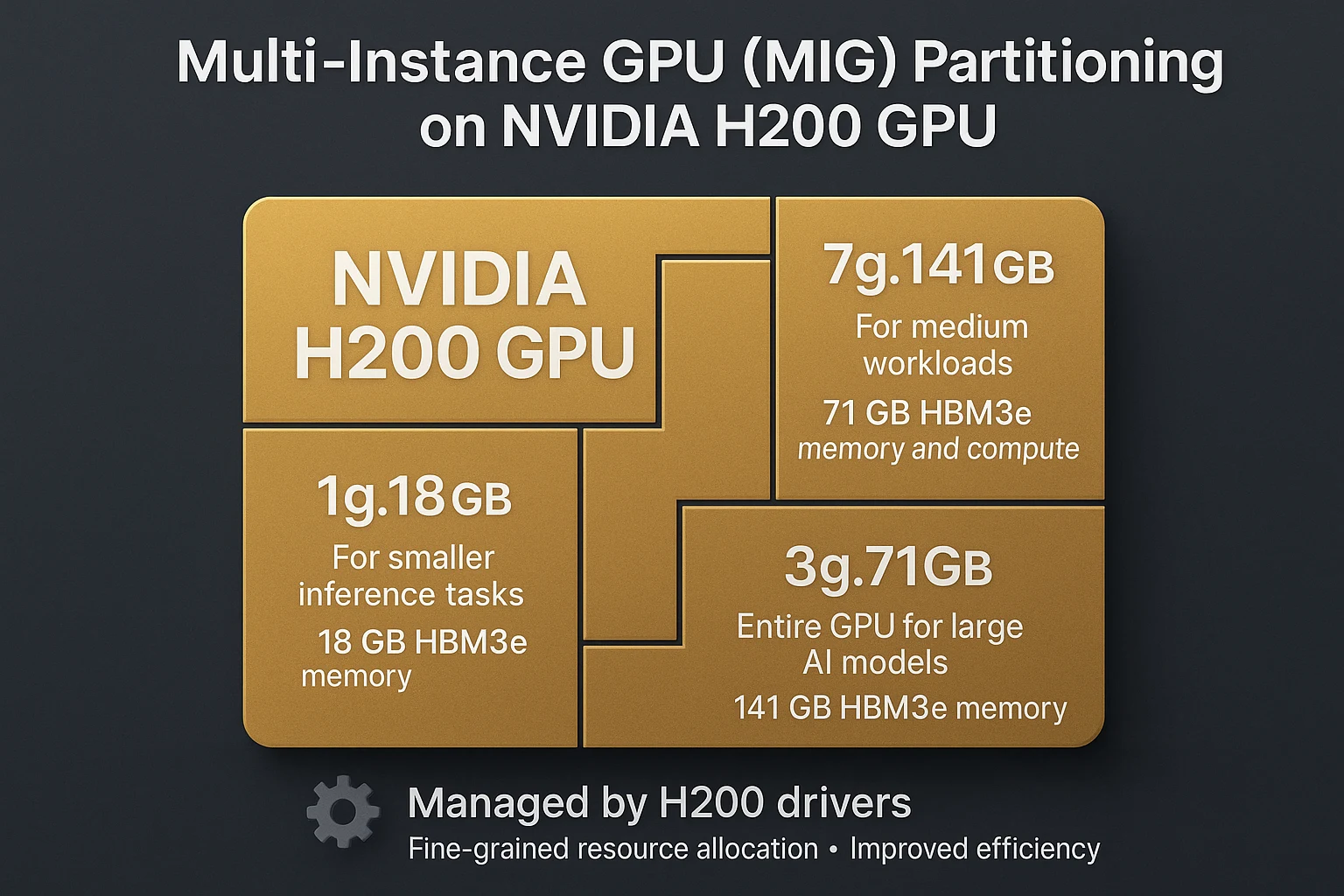
Multi-Instance GPU (MIG) is a hardware feature that allows a single NVIDIA H200 GPU to be divided into multiple isolated GPU instances. Each instance has its own dedicated memory, cache, and compute cores. This partitioning means one physical GPU can run several independent workloads at the same time, improving efficiency in environments where multiple users or applications share the same infrastructure.
H200 drivers are the key enablers of MIG. They expose configuration options that allow IT teams to define GPU slices, assign them to workloads, and ensure proper isolation between instances. Without driver support, the partitioning logic cannot be activated or managed. For example, when deploying workloads on Kubernetes, the driver communicates with the device plugin to make these MIG instances visible to the scheduler. This ensures that each workload receives only the resources it has been assigned, while still maintaining overall hardware utilization.
Each partition created through MIG behaves like a smaller GPU with predictable performance. A 1g.18gb profile, for example, provides a fraction of the GPU with 18 GB of HBM3e memory for smaller inference tasks. A 3g.71gb profile delivers more memory and compute power for medium workloads. The full 7g.141gb configuration makes the entire GPU available for training large AI models. These profiles are documented in the NVIDIA MIG user guide and supported through the H200 driver stack.
For enterprises, this capability enables fine-grained resource allocation. Research teams can run independent experiments without interfering with production inference jobs. Service providers can safely host workloads from multiple customers on the same hardware while ensuring performance isolation. This balance of flexibility and predictability is only possible because the H200 drivers manage how MIG profiles are exposed and scheduled across systems.
3. What Platforms and OS Do H200 Drivers Support?
H200 drivers are purpose-built to operate on validated Linux distributions, ensuring that the GPU hardware works consistently with the operating system. These combinations are not arbitrary. They are tested by NVIDIA to guarantee that workloads run reliably under enterprise and research conditions.
The current driver series for H200 GPUs, version 550, has been validated for Red Hat Enterprise Linux (RHEL) 9.4 as well as Ubuntu 22.04 and Ubuntu 24.04 LTS releases. These operating systems represent the most common platforms for high-performance computing and AI development. RHEL is widely used in enterprise environments where long-term stability and certified support are critical, while Ubuntu is popular in research and machine learning environments for its ease of use and large developer community.
Validated OS–driver combinations are more than a convenience. They provide assurance that features such as GPU memory management, Multi-Instance GPU (MIG), and high-bandwidth interconnects like NVLink operate as intended. Running unsupported combinations can introduce instability or prevent advanced capabilities from being available. For IT leaders, relying on certified support matrices means reducing operational risk while ensuring predictable performance across production and development environments.
4. How to Install and Manage H200 Drivers Effectively?
Installing NVIDIA H200 drivers is not simply about running an installer. It involves careful preparation, the right installation method, and ongoing management to ensure stability in production environments. A disciplined approach helps IT teams avoid downtime and makes advanced GPU features consistently available.
The first step is verifying prerequisites. This includes checking the Linux kernel version, ensuring compatibility with the selected driver release, and confirming that no conflicting GPU drivers are already installed. Skipping this validation can cause failed installations or unstable behavior after reboot.
Once prerequisites are confirmed, administrators can proceed to download the correct H200 driver package from NVIDIA’s official repository. Installation can be performed in two ways: using the distribution’s package manager or by running NVIDIA’s standalone .run installer. Package managers are usually preferred in enterprise environments, as they provide easier updates and dependency handling. The .run installer offers more control but requires manual management of updates.
After installation, a reboot is typically required to load the new kernel modules and initialize the driver. Post-installation testing is essential. Commands like nvidia-smi can be used to confirm the driver version, GPU detection, and feature availability. This step ensures that the H200 is correctly registered with the operating system and APIs such as CUDA.
For large-scale deployments, NVIDIA provides enterprise solutions such as DGX OS. Systems like NVIDIA DGX H100 and H200 platforms ship with validated drivers as part of their software stack. This reduces the operational burden for IT teams by delivering pre-configured environments where GPU drivers, libraries, and management tools are already tuned for stability and performance.
By following a structured installation workflow—pre-checks, validated installation, controlled reboots, and post-installation testing—organizations can ensure that H200 drivers operate reliably. For enterprises, using pre-packaged environments like DGX OS further simplifies driver lifecycle management, especially across large clusters or production-grade AI workloads.
5. How Do H200 Drivers Interact with Kubernetes and GCP Environments?
In containerized environments, GPU drivers are the link between physical hardware and the workloads running in orchestrated clusters. Without the correct driver, Kubernetes pods and cloud-managed GPU services cannot access the underlying GPU resources, leaving workloads unable to launch or scale.
Within Kubernetes, H200 drivers enable several critical components. The NVIDIA GPU Operator automates driver deployment and lifecycle management, while the device plugin exposes GPUs as schedulable resources to pods. In addition, the NVIDIA Container Toolkit ensures that applications packaged as containers can communicate with CUDA libraries and underlying GPU hardware. These elements together ensure that Kubernetes clusters can use H200 GPUs effectively for AI, HPC, and enterprise workloads.
In cloud environments such as Google Kubernetes Engine (GKE), drivers play an equally central role. NVIDIA’s GPU container runtime, which depends on these drivers, ensures that GPU-accelerated containers can run consistently across nodes. AWS EKS offers similar support, where the NVIDIA device plugin and drivers enable pods to request GPU resources reliably.
The common thread across both on-premises Kubernetes and managed cloud services is clear: without properly installed H200 drivers, GPU acceleration is unavailable. For IT leaders and platform architects, this highlights why driver validation is a core step in preparing clusters for production-grade AI workloads.
6. What Are Key Performance and Stability Considerations?
H200 drivers are more than a compatibility layer; they directly influence how reliably workloads run and how effectively the GPU’s hardware resources are used. Both performance and stability depend on aligning driver versions with the CUDA runtime and keeping firmware and drivers tuned for the hardware.
One of the most important factors is driver–CUDA compatibility. Each CUDA toolkit release requires a minimum driver version, and mismatches can prevent workloads from starting. IT teams must review the compatibility matrix before deploying updates to CUDA or GPU drivers.
Properly matched drivers can also deliver measurable performance benefits. NVIDIA’s firmware and driver updates often include refinements that improve GPU scheduling, memory handling, and throughput. On the H200, with its 141 GB of HBM3e memory and 4.8 TB/s bandwidth, these improvements directly affect training speed and inference latency for AI workloads. Without updated drivers, enterprises may leave performance gains untapped.
Stability is another critical dimension. Running unsupported or mismatched drivers can introduce kernel panics, system hangs, or reduced GPU availability. In production clusters, even small driver inconsistencies can cause applications to fail or prevent GPUs from being detected. Unsupported driver versions may also disable features such as Multi-Instance GPU (MIG), which is essential for workload partitioning on H200 systems.
For decision-makers, the lesson is clear: driver management is not a one-time setup task. It requires ongoing validation against CUDA, the Linux kernel, and enterprise application stacks. A structured update policy, with staging and rollback processes, ensures that performance gains are realized without compromising operational stability.
7. What Enterprise Insights Should Infrastructure Leaders Consider?
For enterprise IT leaders, H200 drivers are not just a technical dependency. They should be managed with the same rigor as other core software assets in the data center. Drivers form the bridge between hardware capabilities and production workloads, and their reliability directly affects service availability.
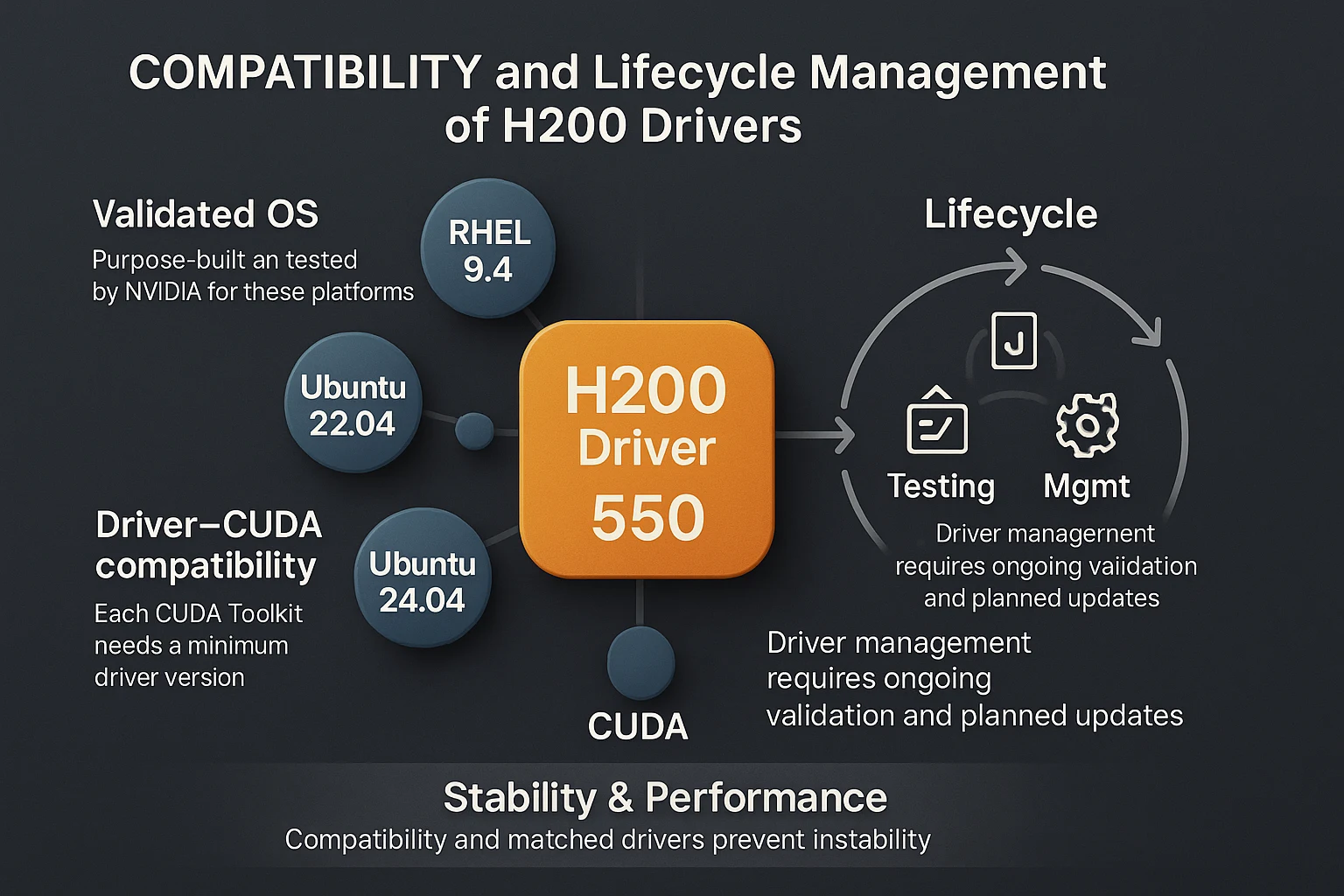
Lifecycle management is a central concern. Updates must be planned rather than treated as ad hoc fixes. A structured process should include verification of prerequisites, deployment in a staging environment, and clear rollback procedures if unexpected behavior arises. This approach reduces downtime risk while ensuring that performance and security improvements from new driver releases can be adopted effectively.
Compliance adds another dimension. GPU drivers may carry licensing requirements, and enterprises must track these to avoid violations. Security is also a compliance issue: NVIDIA periodically issues driver patches that address vulnerabilities, and leaving these unpatched can create unnecessary exposure.
Validation is equally important. Drivers should be tested against production workloads, kernel versions, and orchestration tools such as Kubernetes before being released into live environments. This avoids compatibility failures that could interrupt business-critical AI or HPC applications. Large organizations often formalize this process within service-level agreements (SLAs), ensuring that driver updates are handled in line with uptime and performance commitments.
Conclusion
H200 drivers are far more than technical installers. They serve as foundational infrastructure that enables GPUs to deliver their intended performance, stability, and advanced features. Without the correct driver in place, workloads risk degraded throughput, compatibility issues, or loss of hardware functionality.
For enterprises, this makes driver management a strategic requirement. A sound approach involves aligning drivers with operating systems, kernels, Kubernetes environments, and cloud platforms. By doing so, organizations reduce operational risk while maintaining predictable performance across AI, HPC, and large-scale analytics workloads.
Successful enterprises treat drivers like other critical software components. This means maintaining patch cycles, testing updates in staging, and ensuring compliance with licensing and security standards. Such governance provides resilience and ensures that infrastructure investments continue to deliver their intended value over time.
Semifly supports organizations in building this discipline. Our consulting teams can audit current driver strategies, establish validated H200 driver pipelines, and design governance models that address version control, testing, and update policies. This structured approach allows IT leaders to reduce uncertainty while maximizing the performance and reliability of their NVIDIA H200 deployments.

More Similar Insights and Thought leadership
No Similar Insights Found
Subscribe today to receive more valuable knowledge directly into your inbox
We are writing frequenly. Don’t miss that.
Subscribe to get updates

Unregistered User
It seems you are not registered on this platform. Sign up in order to submit a comment.
Sign up now