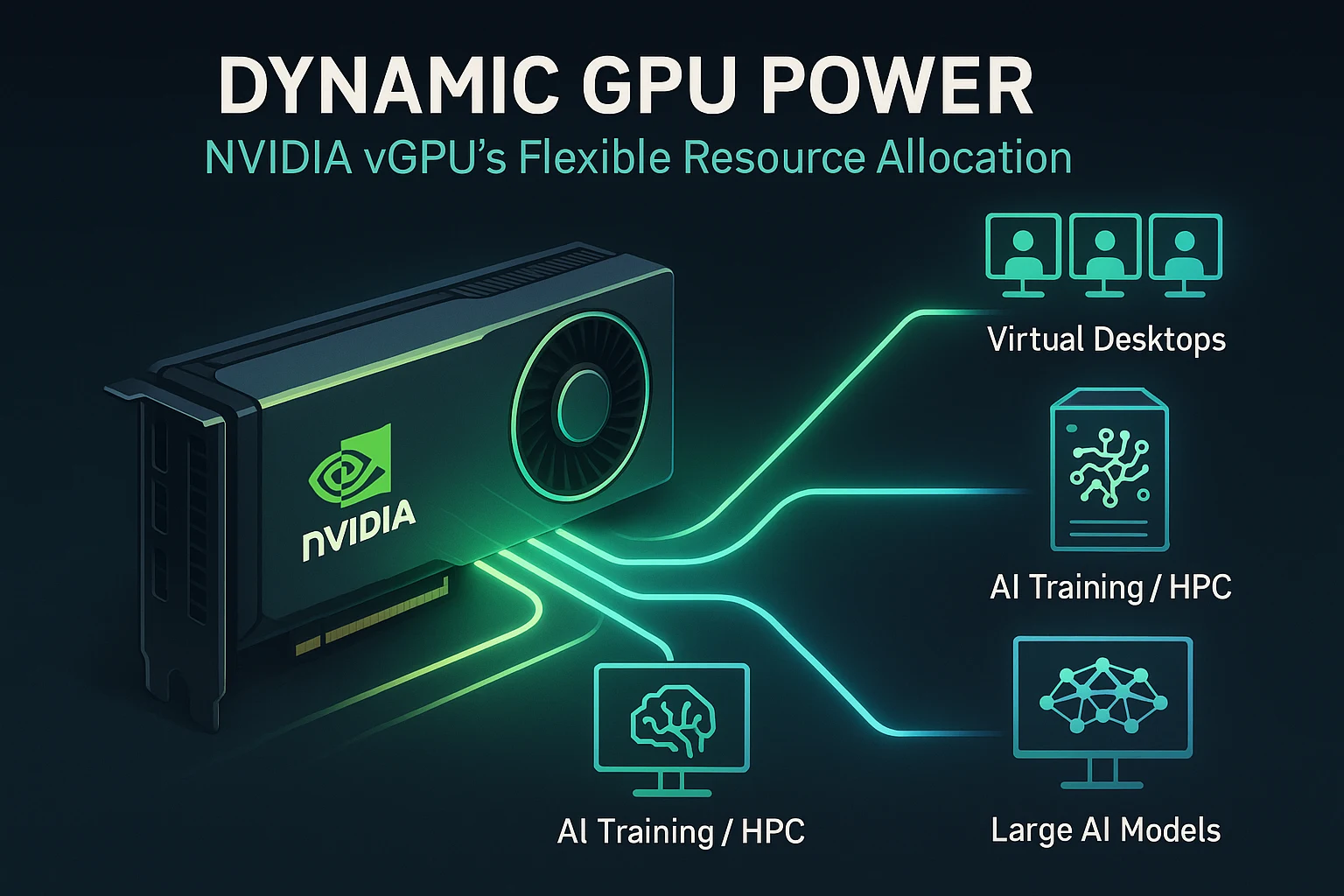
NVIDIA vGPU (virtual GPU) technology transforms the way enterprises deliver GPU-accelerated resources. Instead of dedicating an entire GPU to a single user or workload, vGPU lets multiple virtual machines (VMs) share one physical GPU or assign multiple vGPUs to a single VM. This enables cost-effective deployment of virtual desktops, AI workloads, and data-science tasks, all from one server.
In virtualized environments, the NVIDIA vGPU software layers between the hypervisor and the physical GPU. It securely allocates GPU resources—such as memory, compute cores, and drivers—to each VM. The result is near-native performance for graphics and compute tasks in virtual machines, combined with the flexibility of virtualization.
Whether your goal is AI inference, 3D rendering, or GPU-rich virtual desktops, NVIDIA vGPU makes scaling efficient. It improves GPU utilization, streamlines management, and enhances security—because each VM still runs the standard NVIDIA driver for full compatibility with applications and tools.
011. What Is NVIDIA vGPU and How Does It Work?
NVIDIA vGPU is a graphics virtualization platform that enables multiple virtual machines (VMs) to share or individually access a physical GPU. It uses the same NVIDIA drivers as physical GPUs, which ensures strong graphics and compute performance in virtual environments. This makes it a reliable foundation for workloads like AI, data science, 3D rendering, and virtual desktops.
02Basic Operation
The NVIDIA vGPU software runs at the hypervisor layer, which is the software that manages virtual machines. Here, the vGPU software creates one or more virtual GPU instances. These instances are then assigned to VMs. Depending on configuration, a single physical GPU can be split among several VMs or allocated in full to one VM through passthrough. This setup allows organizations to maximize GPU utilization, reduce hardware costs, and still maintain near-native performance for users.
Clarifying Key Terms
- Shared vGPU
Shared vGPU means partitioning a single physical GPU into smaller slices. Each slice is assigned to a VM. This allows multiple users or workloads to run at the same time while still benefiting from GPU acceleration. - GPU Pass-Through
GPU passthrough means assigning the full GPU to a single VM. In this case, no sharing happens. The VM receives dedicated GPU power, which is useful for highly demanding tasks that need maximum performance. - Multi-vGPU
Multi-vGPU lets a single VM use more than one vGPU at once. These vGPUs can even span across multiple physical GPUs in the server. This capability is particularly useful for large AI models or workloads that need more GPU memory and compute power than a single GPU can provide.
032. Why Should Enterprises Use NVIDIA vGPU?
Enterprises need to balance high performance with efficiency when deploying AI, data science, and virtual desktop environments. NVIDIA vGPU helps solve this challenge by allowing flexible and secure GPU sharing across workloads. It ensures that GPU resources are not wasted and that users get reliable performance.
04Flexible GPU Resource Allocation
With NVIDIA vGPU, a physical GPU can be split into smaller virtual GPUs and assigned to different virtual machines. This flexibility allows organizations to run a mix of workloads on the same hardware. For example, one server can host AI training tasks, engineering simulations, and virtual desktops at the same time. Each workload receives the GPU power it needs without requiring separate dedicated GPUs for each VM.
05Strong Performance in Virtualized Environments
NVIDIA vGPU delivers near-native graphics and compute performance in virtual machines. This means users running AI models, data visualization, or 3D design applications experience high performance even though the GPU is shared. Enterprises can reduce the cost of buying multiple GPUs while still meeting demanding performance needs.
06Simplified IT Management and Enhanced Security
NVIDIA vGPU centralizes GPU resources, which makes it easier for IT teams to manage virtual desktops and AI clusters. Administrators can monitor and adjust GPU allocations without changing physical hardware. Centralized management also improves security since data stays inside the data center rather than being stored on individual devices. This is especially valuable in regulated industries such as healthcare and finance, where strict compliance rules apply.
07Increased Utilization in Remote Work Environments
Remote work often requires secure access to powerful GPU resources for tasks like design, data analysis, or machine learning. NVIDIA vGPU allows users to connect to virtual desktops or applications with GPU acceleration from anywhere. This improves employee productivity while ensuring the organization’s GPUs are fully utilized rather than sitting idle.
Summary Table: Benefits of NVIDIA vGPU
083. What Are the Deployment Options for NVIDIA vGPU?
When deploying NVIDIA vGPU, organizations have three primary deployment paths to choose from. Each option caters to different infrastructure needs and offers trade-offs in performance, flexibility, and scalability.
09Bare-Metal Deployment
In a bare-metal setup, the vGPU Manager is installed directly on certified hardware hosts—servers without another virtual layer in between. This method delivers the lowest latency and highest performance, making it well-suited for demanding applications like AI training, scientific simulations, or high-performance virtual desktops.
10Virtualized Platforms
NVIDIA vGPU works with several popular hypervisors, such as VMware vSphere, Citrix Hypervisor, Linux KVM, and others. These platforms support both shared vGPU (multiple VMs share GPU resources) and GPU pass-through (a VM receives full, exclusive access to a GPU). This gives IT teams the flexibility to match GPU allocations to the workload demands while optimizing resource efficiency.
11Hybrid and Cloud Environments
NVIDIA vGPU also supports hybrid cloud strategies. Organizations can run vGPU locally on-premises and extend into cloud platforms as needed—for example, with GPU-enabled virtual machines that support vGPU use. This model allows enterprises to scale GPU resources on demand and adapt to dynamic workloads while maintaining centralized control.
124. How Can Organizations Set Up NVIDIA vGPU?
Setting up NVIDIA vGPU requires proper planning and alignment between hardware, virtualization software, and licensing. By following the recommended setup process, organizations can ensure smooth deployment and consistent performance for virtual desktops, AI, and data science workloads.
13Verify Hardware Compatibility
The first step is checking whether the server hardware and GPU are compatible. GPUs such as the NVIDIA RTX PRO 6000 Blackwell Server Edition are fully supported for vGPU deployments. Compatibility checks also include ensuring the correct CPU, memory, and storage requirements are in place to support high-performance virtualization.
14Install Virtualization Platform and vGPU Software
NVIDIA vGPU runs on supported hypervisors such as VMware vSphere and Citrix Hypervisor. After installing the virtualization platform, administrators must set up the NVIDIA vGPU Manager software on the host server. This component works with the hypervisor to manage GPU resources and provide them to virtual machines.
15Assign vGPU Profiles to Virtual Machines
Each VM needs a vGPU profile, which defines how much GPU memory and processing power is allocated to it. Profiles range from smaller partitions for office desktops to larger ones for AI training or engineering simulations. Assigning the right profile ensures workloads get the resources they need without wasting GPU capacity.
16Manage with NVIDIA Tools and IT Systems
Once deployed, administrators can manage vGPU instances using NVIDIA licensing portals, monitoring dashboards, or existing IT infrastructure tools. This helps in balancing performance, monitoring GPU usage, and troubleshooting resource issues.
17Licensing and Driver Alignment
Enterprise licensing is a key part of NVIDIA vGPU setup. Proper licensing unlocks advanced features such as live migration and advanced performance monitoring. It is also important to align NVIDIA drivers across hosts and VMs to avoid compatibility problems. Using the same driver versions ensures stability and prevents errors during workload execution.
185. How is GPU Different From vGPU?
Understanding the difference between a GPU and a vGPU is important when planning infrastructure for AI, data science, or graphics-intensive workloads. Both models use NVIDIA technology but differ in how GPU power is allocated to virtual machines.
19Traditional GPU Usage
In a traditional setup, a dedicated GPU such as the NVIDIA H200 is assigned to a single virtual machine or physical system. This means the full processing power, memory, and bandwidth of the GPU are available to just one workload. While this provides maximum performance, it can also lead to underutilization if the workload does not need the full capacity. Dedicated GPUs are powerful but expensive, and scaling requires purchasing and installing additional hardware.
20vGPU Virtualization Model
With NVIDIA vGPU, a single physical GPU is divided into multiple virtual GPU instances. Each virtual machine can be assigned a vGPU profile that defines how much GPU memory and processing power it receives. This model allows several workloads to share the same GPU without interfering with each other. The result is higher hardware utilization, better flexibility, and cost efficiency. Organizations can scale resources dynamically, assigning more GPU power when workloads increase and reducing it when demand is low.
21Key Comparison
- Direct GPU: Provides full GPU performance but is costly and less flexible. Best for workloads that always need maximum GPU capacity.
- vGPU: Shares GPU resources across multiple workloads, increasing efficiency and enabling flexible scaling. This can lower overall costs while still providing strong performance for AI, HPC, and graphics applications.
226. How Does vGPU Compare with VMware vSphere?
Both NVIDIA vGPU and VMware vSphere play important roles in virtualization, but they serve different purposes. While NVIDIA vGPU is focused on GPU sharing and acceleration, VMware vSphere is a broader virtualization platform that manages compute, storage, and networking. Understanding the difference helps organizations choose the right solution for their workloads.
23NVIDIA vGPU: GPU-Focused Virtualization
NVIDIA vGPU is purpose-built for enabling multiple virtual machines to share a single GPU. It delivers near-native performance for both compute and graphics-intensive workloads. With flexible allocation models such as shared vGPU, pass-through, and multi-vGPU, it ensures that each VM gets the right balance of GPU resources.
This makes NVIDIA vGPU a strong choice for workloads like AI development, data science, engineering simulations, 3D design, and virtual desktops that demand high-performance graphics and compute acceleration.
24VMware vSphere: Comprehensive Virtualization Platform
VMware vSphere is a complete virtualization suite that manages not only compute, but also storage and networking resources. While it does support GPUs, the options are limited to passthrough configurations or basic shared models like vSGA (Virtual Shared Graphics Acceleration).
Its main strength lies in enterprise-scale infrastructure management. VMware vSphere provides robust VM scalability, high availability, and centralized IT administration, making it the backbone of many data centers. However, when it comes to advanced GPU virtualization, it often relies on integration with NVIDIA vGPU.
25Summary Table: NVIDIA vGPU vs VMware vSphere
267. What Use Cases Benefit Most from NVIDIA vGPU?
NVIDIA vGPU supports a wide range of workloads across industries. By enabling GPU resources to be shared securely among multiple virtual machines, it delivers both performance and flexibility. This makes it valuable in scenarios where high computational power and graphics performance are required.
27Virtual Workstations
Designers, architects, and engineers often rely on CAD software, 3D modeling tools, and visualization platforms. With NVIDIA vGPU, these teams can access high-end graphics performance remotely. This eliminates the need for heavy local workstations and ensures that even remote employees can work with demanding design tools.
28AI and Machine Learning Workloads
AI development and inference tasks need powerful GPUs to process large datasets and models. With NVIDIA vGPU, data scientists can run LLM inference or training inside virtual machines without requiring dedicated physical GPUs. This improves resource efficiency, reduces idle GPU time, and provides the flexibility to allocate resources based on workload needs.
29HPC Virtualization
High-Performance Computing (HPC) workloads often involve parallel compute jobs such as simulations or research calculations. NVIDIA vGPU makes it possible to securely split GPU power among multiple users or tasks. This ensures efficient use of GPU resources while supporting collaborative research and computational projects.
30Remote Visualization
Organizations that need to deliver GPU-accelerated applications to distributed teams can use NVIDIA vGPU for remote visualization. Users can access complex applications through secure connections, regardless of location. This is especially useful in industries like healthcare, oil and gas, and manufacturing, where professionals must visualize large datasets or models in real time.
31Conclusion
NVIDIA vGPU is transforming how enterprises use GPU resources by making them easier to share, manage, and scale across virtual environments. Instead of dedicating one physical GPU to each workload, organizations can partition powerful GPUs and allocate resources based on need. This makes GPU infrastructure more efficient and more cost-effective.
With vGPU, IT teams can manage GPU resources centrally and deliver them across data centers, cloud platforms, and hybrid environments. This ensures that users get consistent, reliable performance whether they are running CAD designs, AI inference, or HPC simulations.
By optimizing performance, simplifying management, and reducing the need for one-to-one GPU allocation, NVIDIA vGPU positions itself as a cornerstone for modern, AI-driven infrastructure strategies. For enterprises aiming to scale AI and visualization workloads, NVIDIA vGPU is not just a performance upgrade but also a path toward accelerated time-to-value and long-term cost optimization.
← Back to Insights